Development and Version Control
My work
Explanation
In this example of the learning outcome Development and Version Control, I will demonstrate how I used Git and what I learned about development. The examples are from the development project, where we coded the design created during the previous project, Fix UX. My group member and I completed this project.
Action
Git Saving a Significant Part of the Project
My group member and I collaborated by taking turns working on the project. One of us would work, push the changes, and the other would pull them before starting their work. While this approach is not ideal, it worked well for us because we had enough time, and it avoided major issues—until one instance where the CSS was not pulled completely. This caused some stress and confusion. However, because we frequently pushed our work to the repository, I was able to retrieve the missing code quickly. This experience demonstrated the importance of version control and how Git saved us a lot of time and effort.
Using Local Storage
In class, we learned about local storage. I once used local storage in my previous portfolio (link) to save a certain value. This previous experience and this lesson helped me in the development project of Hike One.
In this project, I used local storage to save all the values of the selected healthcare choices. I first set the values, and then I used 'get' to display them on a different page. I struggled quite a bit with this process, and I used ChatGPT a lot to help me. This resulted in a lot of repeated code. In the image below, you can see that I first set the value of the calculated price. This means that the value of this price is now stored in the local storage.
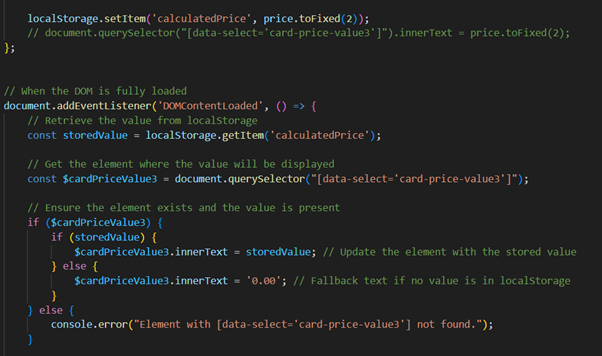
To make sure the value is actually in the local storage you can right-click on the website and click on inspector. Then you can go to 'application' and then you should see the set value.
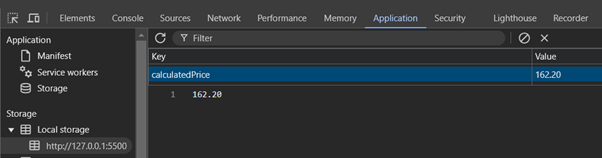
As you can see in the image above, the calculated price is now stored in the local storage. I learned about this from my teacher.
In the second part of the code, you can see that I'm 'getting' the item. First I'm making a variable of the get code. This allows me to use it in other places, and it makes the code shorter. Secondly, I'm making a variable out of the element from the HTML where I want to display the price. Thirdly, I'm checking if the variable is 'real' by doing a quick if statement. Then inside the if statement is another if statement that checks if the stored value is 'real' and if it is the inner text of the variable with the HTML will get changed to the stored value of the price. If the value isn't 'real' the inner text will be 0.00, this is a small error handling piece of code to make sure there is no error if something goes wrong with the value in the local storage.
Here is the link to the JavaScript code.
Here is the link to the HTML code.
Here is the link to the GIT.
Reflection
Overall, I am content with how this project turned out, as we completed everything we set out to do.
The use of Git had both positive and less positive aspects. On the positive side, our frequent pushes allowed us to retrieve lost code quickly. On the less positive side, taking turns working on the project could have been more efficient if we had implemented a better workflow.
In the future, I plan to improve how I collaborate using Git. Overall, I am happy with this project, as it allowed me to try new things and focus on my tasks, which made it less overwhelming for me.
See full documentation here: FULL DOCUMENTATION