Interactive Media Products
My work
Explanation
For this example of interactive media products, I will show my portfolio's prototypes.
Action
First prototype
This is the first prototype I made: First functional prototype
It is not fully functional, and not all the buttons work, but it was the first draft of my website.
Before and After:
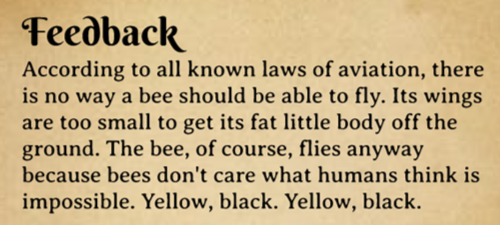
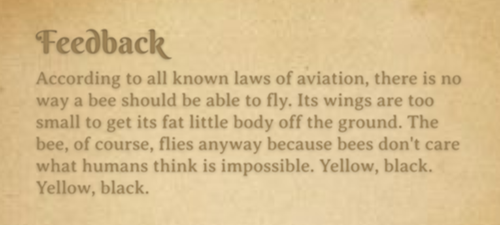
The biggest difference between the new and old versions of the text is that on the old version, it really looks like the text is not a part of the paper like it is 'on the book', but on the new version, the text blends into the book and makes it look like its real text in a book.
Second prototype
This is the second prototype I made: Second functional prototype
The only thing about this prototype that does not work is the drop-down menu in the top right corner. You can use the footer navigation to navigate.
I showed my mother (55, and not exactly tech-savvy) this prototype. I showed her this to test the navigation of the prototype. This was hindered by the non-functioning drop-down menu.
I asked my mother to test the navigation of the website because, as someone outside my target audience, she could identify navigation flaws that might also affect others. If she encountered any difficulties, it would highlight areas for improvement, ensuring the website is intuitive for all users, including my teachers.
To summarize this test:
- Positives: Users recognize key buttons (e.g., Discover) and like the fairytale theme.
- Pain Points: Navigation is very confusing, with unclear paths and poor feedback for interactions. Scrolling isn't intuitive on the Home Page, and users expect the entire image to be clickable on the Discover Page.
- Interactivity Issues: The wand's function is unclear, and users struggled with dragging the secret key (Figma issue). Memes on the Secret Page were not understood.
After conducting the user test, I decided to redo my prototype. This decision was based not only on the feedback from the test but also on my observation that the website's navigation would be quicker and more efficient if I added a navigation bar at the top. So, the main thing I changed was the menu. I did not add any hover effects in this prototype.
Before and After:


I decided to change the menu to a dropdown menu because I thought this would make the navigation clearer. This was the only thing I changed for the navigation because most navigation issues were caused by my lack of Figma skills (mainly no hover effects). I made some further iterations and then came up with my final prototype.
Final prototype
This is the final prototype I made: Second functional prototype
I showed this prototype to my teacher and the feedback I got for the navigation was that it was clear. I decided to start coding my website with this prototype in mind.
Reflection
Reflecting on this process, I feel like I could have made the prototypes better but my abilities only went this far. I also know that I should have asked for way more feedback on multiple aspects of the design. I didn't do this because I wanted to make something I was satisfied with before I showed my work.
In the future, I plan to change this behavior. I will ask for more feedback and I will try to improve my Figma skills.
The user test I did was not the most useful because the prototype was not fully functional which hindered testing the navigation. So, in the future, I will think more about the necessity of conducting user tests.
See full documentation here: FULL DOCUMENTATION